Style Canvas: Beauty Creator stands out for its simplicity and daily variety. The rotating themes keep the experience fresh without overwhelming the player. The interface is responsive on both desktop and mobile, making it easy to pick up and play anywhere. The cheerful art style and lack of pressure create a relaxing atmosphere that encourages experimentation. For anyone looking for a low-stakes creative outlet, this game delivers consistent enjoyment.
Description
Daily Creative Prompts
Each session presents a new theme that encourages players to experiment with color combinations and accessory choices. These rotating prompts ensure no two visits feel the same, providing a steady stream of inspiration. Whether the focus is on bold contrasts or subtle harmonies, the game rewards those who try unexpected pairings. The variety keeps the experience engaging without overwhelming the player, making it easy to return day after day.
Toolkit for Self-Expression
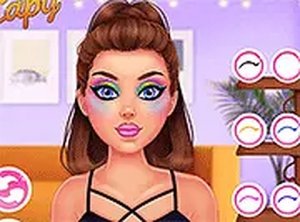
The core interaction revolves around a simple palette of cosmetic tools. Players can adjust foundation tones, apply blush, select eyeshadow colors, and choose lipstick shades. Each tool responds instantly, allowing for quick adjustments and experimentation. The interface is designed to be intuitive, so even first-time users can start creating within seconds. This low barrier to entry makes the game accessible to a wide audience.
Visual Style and Atmosphere
The art direction leans toward bright, cheerful aesthetics with clean lines and soft gradients. Characters are presented in a stylized manner that emphasizes personality over realism. The overall mood is upbeat and welcoming, reinforcing the game's focus on creativity rather than competition. Backgrounds and UI elements are kept minimal to keep the attention on the player's creations.
Cross-Platform Accessibility
Optimized for both desktop and mobile browsers, the game adapts its layout to fit different screen sizes. Touch controls on tablets and phones feel natural, while mouse-based navigation on computers offers precision. No downloads or account creation are required, which means players can jump in from any device with an internet connection. This flexibility supports spontaneous play sessions during short breaks or longer creative periods.
Sharing and Saving Creations
Once a look is complete, players have the option to save their work locally or share it with friends. The sharing feature uses simple links rather than complex social media integrations, keeping the process straightforward. This allows players to showcase their designs without exposing personal data. The ability to revisit past creations also encourages reflection on how personal style evolves over time.
Compatibility
Play on Any Device | Chrome / Safari / Edge Recommended
Faq
Can I play Style Canvas: Beauty Creator on my phone?
Yes, the game is fully optimized for mobile browsers. It works on both iOS and Android devices without requiring any app download. The touch interface is designed to be responsive, making it easy to select colors and apply makeup with your fingers.
Are there any in-app purchases or hidden fees?
No, Style Canvas: Beauty Creator is completely free to play. There are no in-app purchases, subscription fees, or premium content locked behind paywalls. All tools, colors, and accessories are available from the start without any cost.
How often are new themes added to the game?
New daily challenges are introduced each day, providing fresh inspiration for players. These themes rotate regularly, so there is always something new to try. The exact schedule may vary, but the game consistently offers updated content to keep the experience engaging.
Is this game suitable for children?
Yes, the game is designed with a family-friendly environment in mind. There is no violent content, inappropriate themes, or chat features. The focus is entirely on creative expression through color and style, making it appropriate for players of all ages.
Do I need to create an account to save my designs?
No account creation is required. You can save your finished looks directly to your device using the built-in save function. If you want to share your creations, the game provides a simple link that you can send to friends without logging in or sharing personal information.
Can I undo a mistake while applying makeup?
Yes, the game includes an undo feature that lets you revert the last action. This makes it easy to experiment with bold color combinations without worrying about permanent errors. You can also reset the entire look and start over from scratch at any time.
Player Comments
💬
Sign in to comment
You must be logged in before posting a review or rating.







Player Comments
Sign in to comment
You must be logged in before posting a review or rating.
No account? Create one
No comments yet. Be the first to comment!