Little Bug Fashion Studio offers a refreshingly simple and safe dress-up experience for young children. The three characters each have distinct looks, and the accessory options encourage imaginative combinations. Parents will appreciate the lack of timers, scores, or in-app purchases. The bright visuals and responsive controls make it a reliable choice for quiet playtime.
Description
Creative Character Styling
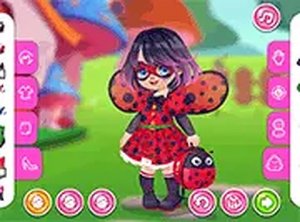
Little Bug Fashion Studio focuses on letting players express their imagination through clothing. Each of the three main characters can be dressed in a variety of tops, skirts, and dresses that feature bright reds, blacks, and playful patterns. The game encourages experimentation by allowing items to be layered or swapped freely. There are no wrong combinations, so children can try bold pairings without fear of failure. This open-ended approach helps build confidence in personal style choices from an early age.
Accessory Options & Details
Beyond basic clothing, the studio offers a selection of whimsical accessories that complete each look. Players can add delicate wings, headbands with tiny antennae, and other decorative items that enhance the bug theme. Each accessory is designed with soft colors and gentle animations, making the characters come alive as they move. The simple interface lets kids drag each piece onto the character with ease, and items snap into place automatically. This focus on fine motor skills makes the game both entertaining and subtly educational.
Visual Appeal & Atmosphere
The game world is filled with cheerful backgrounds and friendly character expressions. Every action, from selecting a new dress to adjusting a headband, triggers a small animation that rewards the player's choice. The color palette is intentionally bright but not overwhelming, using pastel greens, sunny yellows, and soft pinks alongside the signature red-and-black ladybug colors. This thoughtful design keeps young players engaged without overstimulating them. The overall mood is calm and supportive, perfect for short play sessions.
Accessibility & Platform
Little Bug Fashion Studio runs entirely in a web browser, so there is no software to install or update. It works on both desktop computers and tablets, with touch screen support for mobile devices. The game also includes a full screen mode that removes distractions, allowing children to focus on their creations. Because it is free to play with no advertisements or in-app purchases, parents can feel comfortable letting their kids explore independently. The straightforward controls mean even preschoolers can start playing without help.
Compatibility
• OS: Windows 10+, macOS 11+, iOS 14+, Android 10+
Is Little Bug Fashion Studio suitable for very young children?
Yes, the game is designed for kids as young as three years old. The controls are simple drag-and-drop actions, and there are no timers or scores that might cause stress. All content is family-friendly with no scary or inappropriate themes.
Do I need to create an account to play Little Bug Fashion Studio?
No account or registration is required. The game loads directly in your browser and is ready to play immediately. This makes it easy for children to access without needing parental help for logins.
Can I save my character designs in the game?
The game does not include a save feature, so designs are not stored between sessions. However, players can take screenshots on their device if they want to keep a record of their favorite outfits.
How many characters are available to dress up?
There are three unique characters to style, each with their own base appearance. Players can dress all three in different outfits during a single session, mixing and matching items across characters.
Does the game include any competitive elements or leaderboards?
No, there are no scores, timers, or leaderboards. The experience is purely creative and relaxing, allowing children to focus on fashion without any pressure to perform or compete.
Is the game available on mobile devices?
Yes, Little Bug Fashion Studio works on smartphones and tablets with touch screens. The drag-and-drop controls are optimized for finger input, and the game adjusts to different screen sizes automatically.
Player Comments
💬
Sign in to comment
You must be logged in before posting a review or rating.








Player Comments
Sign in to comment
You must be logged in before posting a review or rating.
No account? Create one
No comments yet. Be the first to comment!