Cloud Gems: Tile Swap offers a calm yet engaging puzzle experience. The core swapping mechanic is easy to learn, and the gradual introduction of sticky webs and moving insects keeps each level interesting. The bright visuals and lack of time pressure make it ideal for casual players. Special gem creation adds a layer of strategy for those who want to optimize their scores. A solid choice for anyone seeking a relaxing brain teaser.
Description
The Core Matching Mechanic
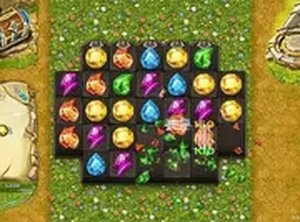
Players select adjacent tiles and exchange their positions. When three or more identical gems form a straight line, they vanish from the board and award points. The goal is to clear enough tiles to meet each level's target. There is no time pressure in most stages, allowing thoughtful planning. The controls are simple: click or tap two neighboring gems to swap them. This straightforward system makes the game accessible to newcomers while still offering depth for those who enjoy optimizing their moves.
Obstacle Encounters
As players advance, they meet sticky webs that temporarily lock tiles in place. These webs require extra swaps to remove, slowing progress. Another challenge involves small insects that move across the board. Players must time their swaps carefully to avoid disrupting their strategy. These elements add variety without making the experience frustrating. Each obstacle type appears in specific levels, keeping the gameplay fresh. The difficulty curve is gentle, so players can adapt gradually.
Visual Style and Atmosphere
The game is set on a floating island with a bright, colorful palette. Gems have distinct shapes and hues, making them easy to distinguish. Backgrounds change as players unlock new areas, revealing different parts of the sky landscape. The overall look is cheerful and inviting, suitable for a wide audience. Smooth animations accompany each swap and gem removal, providing satisfying feedback. The interface is clean, with clear score displays and level progress indicators.
Progression and Rewards
Completing levels unlocks new zones on the island. Each zone has a unique visual theme and introduces fresh obstacle combinations. Players earn points for each match, with bonus points for larger matches. Special gems appear when matching four or more tiles, clearing a wider area. The game tracks overall progress, encouraging players to return and continue. There are no in-app purchases or ads that interrupt play, keeping the focus on the puzzle experience.
Tips for Efficient Play
Look for opportunities to create matches of four or more gems. These generate special tiles that clear rows, columns, or surrounding areas. Planning ahead helps avoid getting stuck by webs or moving obstacles. Since there is no timer, take time to scan the board for the best possible move. Practice improves pattern recognition, leading to faster and more efficient clearing. Using full-screen mode reduces distractions and gives a better view of the entire board.
Compatibility
✅ This game supports:
- Desktop browsers (Chrome, Edge, Safari)
- Mobile browsers (Chrome on Android, Safari on iOS)
❌ Does NOT support: - Internet Explorer - Very old browser versions
👉 Try refreshing or updating your browser
Faq
Is Cloud Gems: Tile Swap free to play?
Yes, the game is completely free to play in your browser. There are no download requirements or hidden fees. You can access it on any desktop computer with an internet connection.
Do I need to create an account to play?
No account registration is necessary. You can start playing immediately by visiting the game page. Progress is saved automatically in your browser for the current session.
What happens when I match four or more gems?
Matching four or more gems creates a special tile. For example, matching four in a row may produce a tile that clears an entire row or column. These special tiles help you clear obstacles and reach level goals faster.
Can I play on a mobile phone or tablet?
The game is optimized for desktop browsers. While it may load on mobile devices, the controls and layout are designed for larger screens. For the best experience, use a computer with a mouse or keyboard.
How do I remove sticky webs from the board?
Sticky webs lock tiles in place. To remove them, you must swap a gem adjacent to the web. After a successful swap, the web disappears, freeing that tile for future matches. Plan your moves to clear webs efficiently.
Is there a time limit in any levels?
Most levels do not have a time limit, allowing you to think through each move. A few later stages may introduce timed challenges, but the majority of the game is relaxed and pressure-free.
Player Comments
💬
Sign in to comment
You must be logged in before posting a review or rating.









Player Comments
Sign in to comment
You must be logged in before posting a review or rating.
No account? Create one
No comments yet. Be the first to comment!